KOMAGIRE
Print long PDFs
in small batches.
Send fewer pages at a time and print one complete copy after another. The app waits for each job's Windows queue processing to finish before sending the next batch.
Download for Windowsv0.1.1 preview. Windows 10 / 11, 64-bit. ZIP, about 24 MB. No Python installation required.
Fixes v0.1.0 stopping after the first job on physical printers.
PDF processing stays on your PC. You do not need to upload your document to this site.
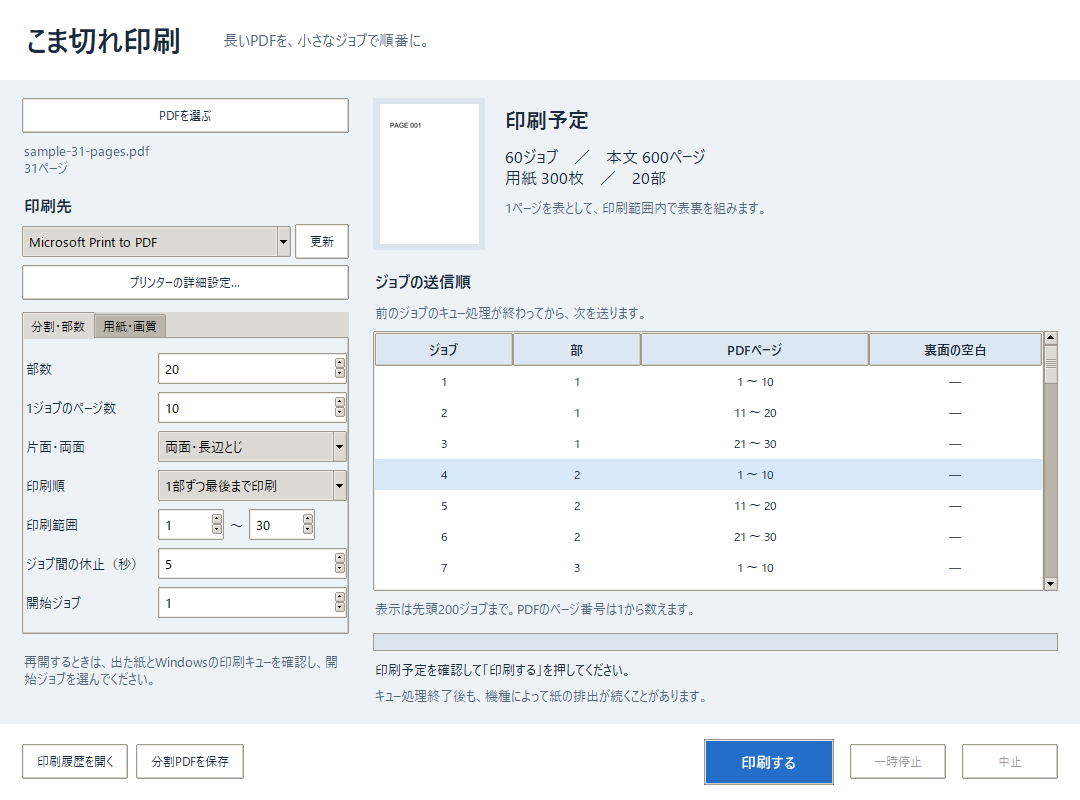
30 pages, 20 copies. Split each copy into three 10-page jobs.
Repeat these three jobs for each of the 20 copies: 60 jobs, 600 content pages, or 300 sheets with duplex printing.
Choose the batch size and printing order.
Small batches, sent in order
Start with 10 pages per job. Set the number of copies, page range, batch size and delay between jobs. Print one complete copy at a time, or all copies of each batch.
Keep front and back together
Supports automatic long-edge and short-edge duplex. Batches end on even page boundaries. A blank back is added when a copy ends with an odd number of pages.
Check where printing stopped
Pause or cancel a run. Errors stop further submissions. Check the output and Windows queue, then select the starting job to resume without an automatic retry.
Getting started
- Extract the downloaded ZIP and open
Komagire.exe. - Choose a PDF and a printer. Save Word and other documents as PDF first.
- Set copies, pages per job, simplex or duplex, and paper size. Review the planned jobs.
- Test with one copy of pages 1–2 before printing the full document. The app interface and included manual are in Japanese.
This is a preview release. Long print runs on physical printers and duplex binding orientation have not been tested. Splitting jobs will not resolve every printer failure.
Windows queue completion does not guarantee that paper output has finished. Adjust the delay for your printer. Manual duplex, actual-size and borderless printing, and booklet imposition are not supported.
Verified with 229 automated tests and startup and UI checks on the distributed executable. Six virtual-printer jobs producing 22 pages were verified with v0.1.0. The ZIP includes a numbered test PDF, a manual, a verification record and full third-party license notices.
Download details and SHA-256
Published October 15, 2026. Updated October 30, 2026 (v0.1.1).
Komagire-0.1.1-Windows.zip
SHA-256
19dd0dd6954335b7a49fc28ca64221fcd13aad8036f6eecd280c4bcd6ba19053